
In this story
Published: November 4, 2026
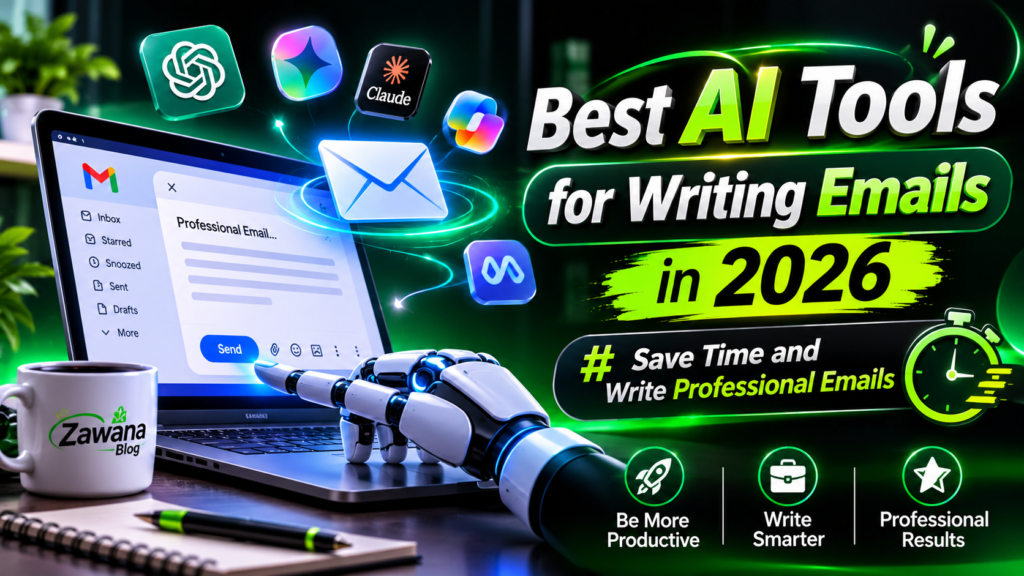
Writing professional emails is an important part of everyday communication. Whether you are contacting a client, applying for a job, responding to customers, communicating with colleagues, or following up on an important meeting, writing the right message can take time.
Fortunately, artificial intelligence is changing how people write emails. Modern AI tools can help users create professional messages, correct grammar, improve tone, summarize conversations, and respond to emails more efficiently.
But which AI tool is best for writing emails in 2026?
In this guide, we explore some of the most useful AI email-writing tools, explain their features, compare their advantages, and show you how to choose the right assistant for your communication needs.
1. Why Use AI to Write Emails?
AI email-writing tools are designed to make communication faster, clearer, and more effective. Instead of starting with a blank page, users can describe what they want to communicate and receive a suggested email in seconds.
Here are some of the main benefits:
- Save time: Generate email drafts without writing everything from scratch.
- Improve grammar: Identify spelling mistakes and unclear sentences.
- Choose the right tone: Make messages sound professional, friendly, formal, or persuasive.
- Write better replies: Generate responses to customer questions and business conversations.
- Organize ideas: Turn short notes into complete, structured emails.
- Improve productivity: Spend less time writing repetitive messages.
AI does not replace human judgment. It provides a starting point that users can review, personalize, and improve before sending.
2. Best AI Tools for Writing Emails in 2026
Several AI platforms offer useful email-writing capabilities. The best choice depends on your workflow, budget, and the applications you already use.
1. ChatGPT – Best Overall AI Email Writing Assistant
Official website:
ChatGPT is a versatile AI assistant that can help users write almost any type of email. You can describe the situation, explain the message you want to communicate, and ask it to create a polished email.
For example, you can ask ChatGPT to write a professional job application, a customer support response, a business proposal, or a polite follow-up message.
Main features:
- Generates complete email drafts from simple instructions.
- Rewrites messages in different tones.
- Corrects grammar and improves clarity.
- Creates short, formal, friendly, or persuasive emails.
- Helps prepare replies to complicated conversations.
Example prompt:
“Write a professional email to a potential client introducing my digital marketing services. Keep it friendly, clear, and persuasive, and include a short call to action.”
Advantages:
- Flexible for many email situations.
- Easy to use with natural-language instructions.
- Useful for beginners and professionals.
Limitations:
- You should check facts, names, dates, and important details.
- Generated messages may need personalization before sending.
Best for: Freelancers, students, business owners, professionals, and everyday users.
2. Grammarly – Best for Grammar and Professional Tone
Official website: https://www.grammarly.com/
Grammarly is widely used to improve writing quality. Its AI-powered writing features can help users create clearer emails, correct grammar, and adjust their writing style.
It is particularly useful when you already have an email draft but want to make it sound more professional.
Main features:
- Grammar and spelling assistance.
- Suggestions for clearer sentences.
- Writing tone improvements.
- AI-assisted writing and rewriting.
- Support for professional communication.
Advantages:
- Helpful for proofreading.
- Makes written communication clearer.
- Useful for people who write emails regularly.
Limitations:
- Some advanced features require a paid subscription.
- AI suggestions should still be reviewed.
Best for: Professionals, students, job seekers, and people who want polished writing.
3. Google Gemini – Best for Google Workspace Users
Official website:
Google Gemini is an AI assistant that can help users create email drafts, summarize information, and improve written communication.
For people who work with Google’s ecosystem, Gemini’s integration with supported Google Workspace services can make email-related tasks more convenient. Availability depends on the account, subscription, and supported features.
Main features:
- Generates email drafts.
- Rewrites messages for different audiences.
- Summarizes information.
- Helps organize ideas before writing.
- Works alongside supported Google services.
Advantages:
- Convenient for users already working with Google products.
- Useful for drafting and summarizing.
- Supports a wide range of writing tasks.
Limitations:
- Some Workspace features require an eligible plan.
- Available features can differ between personal and business accounts.
Best for: Gmail users, students, teams, and Google Workspace customers.
4. Microsoft Copilot – Best for Microsoft Outlook Users
Official website:
Microsoft Copilot provides AI assistance for writing, rewriting, and improving professional communication.
For users working in Microsoft 365, eligible Copilot features can assist with email drafting and summarization in Outlook.
Main features:
- Helps draft professional messages.
- Rewrites emails with different tones.
- Summarizes email conversations.
- Helps organize communication.
- Integrates with supported Microsoft 365 applications.
Advantages:
- Useful in professional Microsoft environments.
- Can help with lengthy email conversations.
- Supports business productivity workflows.
Limitations:
- Some Outlook capabilities require eligible Microsoft 365 plans.
- Features vary depending on the account and application.
Best for: Businesses, office workers, and Microsoft Outlook users.
5. Claude – Best for Natural and Detailed Emails
Official website:
Claude is an AI assistant that can help create detailed, natural-sounding messages. It is particularly useful when an email needs a thoughtful explanation, a careful response, or a well-organized structure.
Users can provide background information and request a specific tone, length, or format.
Main features:
- Drafts detailed professional emails.
- Rewrites complicated messages.
- Improves structure and readability.
- Adjusts tone and writing style.
- Helps organize lengthy information.
Advantages:
- Useful for longer messages.
- Can help make complex explanations easier to understand.
- Flexible writing assistance.
Limitations:
- Generated information should be checked.
- It is not automatically connected to every email provider.
Best for: Professionals, consultants, researchers, and people writing detailed business messages.
3. Comparison: Which AI Email Tool Should You Choose?
Choosing the right tool depends on what you need most.
| AI Tool | Main Strength | Ideal User |
|---|---|---|
| ChatGPT | Flexible email generation | Everyone |
| Grammarly | Grammar and tone | Writers and professionals |
| Google Gemini | Google ecosystem | Gmail users |
| Microsoft Copilot | Outlook productivity | Business users |
| Claude | Detailed natural writing | Professionals |
Our recommendation: ChatGPT is an excellent starting point for users who want a flexible AI email-writing assistant. Grammarly is especially useful for proofreading, while Gemini and Copilot are attractive options for people already working within their respective ecosystems.
There is no single tool that is best for everyone.
4. How to Write a Professional Email Using AI
You do not need advanced technical knowledge to use an AI email assistant. Follow these simple steps:
Step 1: Explain your situation.
Tell the AI why you need to write the email. For example, you might need to contact a customer, request information, or apply for a job.
Step 2: Specify the tone.
Choose whether you want a formal, friendly, professional, persuasive, or simple message.
Step 3: Provide important details.
Include the recipient’s role, your main purpose, and any relevant information. Avoid sharing confidential information unnecessarily.
Step 4: Generate your email.
Ask the AI to create a subject line, greeting, message body, and closing.
Step 5: Review before sending.
Check names, dates, facts, attachments, and any promises made in the message. Make sure the email accurately represents what you want to say.
5. Five Useful AI Prompts for Writing Emails
One of the easiest ways to get better results from AI is to provide clear instructions.
Here are five prompts you can copy and use:
Prompt 1: Professional Business Email
“Write a professional business email introducing my company to a potential client. Use a confident but friendly tone and include a clear call to action.”
Prompt 2: Job Application Email
“Create a professional job application email for a marketing position. Highlight my interest in the role, keep it concise, and suggest an appropriate subject line.”
Prompt 3: Customer Support Reply
“Write a polite customer support response apologizing for a delayed order. Explain that we are checking the situation and reassure the customer that we will provide an update.”
Prompt 4: Follow-Up Email
“Write a short and professional follow-up email to someone who has not responded to my previous business proposal. Keep the message respectful and avoid sounding demanding.”
Prompt 5: Improve My Existing Email
“Rewrite the following email to improve its grammar, clarity, and professional tone. Keep the original meaning and do not invent any information: [Insert your email].”
6. Are AI Email-Writing Tools Free?
Many AI platforms offer free access or limited free features. However, access to advanced models, higher usage limits, business integrations, and additional writing capabilities may require a paid subscription.
Before choosing a platform, consider:
- Whether the free version meets your needs.
- The monthly subscription price.
- Available integrations with your email provider.
- Privacy and data-handling policies.
- Whether the features you need are included in your plan.
Always check the official pricing page because subscriptions and available features can change.
Useful official resources:
- ChatGPT: https://chatgpt.com/
- Grammarly: https://www.grammarly.com/
- Google Gemini: https://gemini.google.com/
- Microsoft Copilot: https://copilot.microsoft.com/
- Claude: https://claude.ai/
7. Is It Safe to Use AI for Writing Emails?
AI can make email writing easier, but users should be careful about the information they provide.
Avoid entering passwords, financial information, confidential business documents, private customer records, or other sensitive personal data into AI tools unless you have verified that the service and your account are approved for that use.
You should also review each generated email before sending it. AI can misunderstand instructions, produce inaccurate details, or suggest language that does not match your intentions.
For additional guidance, consult these official resources:
8. The Future of AI-Powered Email Writing
AI-powered communication is becoming an important part of modern digital productivity. Email assistants are moving beyond simple grammar correction and basic text generation.
Future developments may include more personalized responses, improved conversation summaries, smarter scheduling suggestions, and better integration with business applications.
As these technologies evolve, users will have more opportunities to automate repetitive communication while keeping control over their messages.
However, human judgment, accuracy, and personal communication will remain important.
Conclusion: What Is the Best AI Tool for Writing Emails in 2026?
AI email-writing tools can help people communicate more effectively, reduce repetitive work, and create professional messages in less time.
ChatGPT stands out as a flexible choice for generating emails from simple instructions. Grammarly is a strong option for improving grammar and tone, while Google Gemini and Microsoft Copilot offer useful capabilities within their respective productivity ecosystems. Claude is another valuable option for detailed and natural-sounding messages.
The best solution is the one that fits your daily workflow, writing style, and budget.
Our final advice: Start with a free version, test the features you need, and always review AI-generated messages before sending them.
At Zawana Blog, we explore useful AI tools, digital creativity, and modern technology to help readers discover smarter ways to work and communicate.