

In this story
Updated: November 7, 2026 ·
Software development is changing, and one of the biggest reasons is artificial intelligence.
A few years ago, developers mainly used AI to get code suggestions, explain programming concepts, or find small mistakes. However, things are moving much faster now. Modern AI coding assistants can understand project files, suggest solutions, edit multiple files, identify bugs, and even work through complicated development tasks.
Look at tools such as Claude Code, Cursor, and GitHub Copilot. They are attracting attention because they offer something beyond simple code completion.
And this is not just another technology trend. According to Torii Research’s November 2026 AI Breakout report, AI coding and building represents 30% of the 30 applications in its ranking, making it the largest category in that edition.
So, why are developers becoming interested in these tools? What can they actually do, and could they change the way software is built?
Let’s take a closer look.
Why Are AI Coding Assistants Becoming So Popular?
The main reason is simple: developers want to spend less time on repetitive programming work and more time solving important problems.
Writing software involves much more than typing code. Developers need to understand existing projects, investigate errors, test new features, update files, and make sure everything works together.
This is where AI coding assistants can help.
Instead of searching through documentation every time they encounter a problem, developers can describe what they want in natural language and receive suggestions based on their code.
Some advanced tools can also take action. For example, a developer can ask an AI agent to investigate a bug, identify the files responsible, suggest a solution, and run tests.
However, the important difference is that not every AI coding tool works in the same way. Some focus on helping you write code faster, while others are designed to handle larger tasks with less direct input.
What Does the Latest Data Tell Us?
The growing interest in AI coding assistants is supported by recent industry research.
Torii published its November 2026 AI Breakout report on November 3, using anonymized and aggregated company usage data from October 2026.
One interesting finding is that AI coding and building accounts for 30% of the applications in its top 30 AI app ranking, representing 9 applications.
Cursor AI appears at number five, while Claude Developer is at number nine. Other development-related applications include Google Antigravity, Gemini Code Assist, and OpenAI Codex.
Another useful perspective comes from the 2026 Stack Overflow Developer Survey.
Among 12,255 respondents answering its question about AI coding tools used during the previous year:
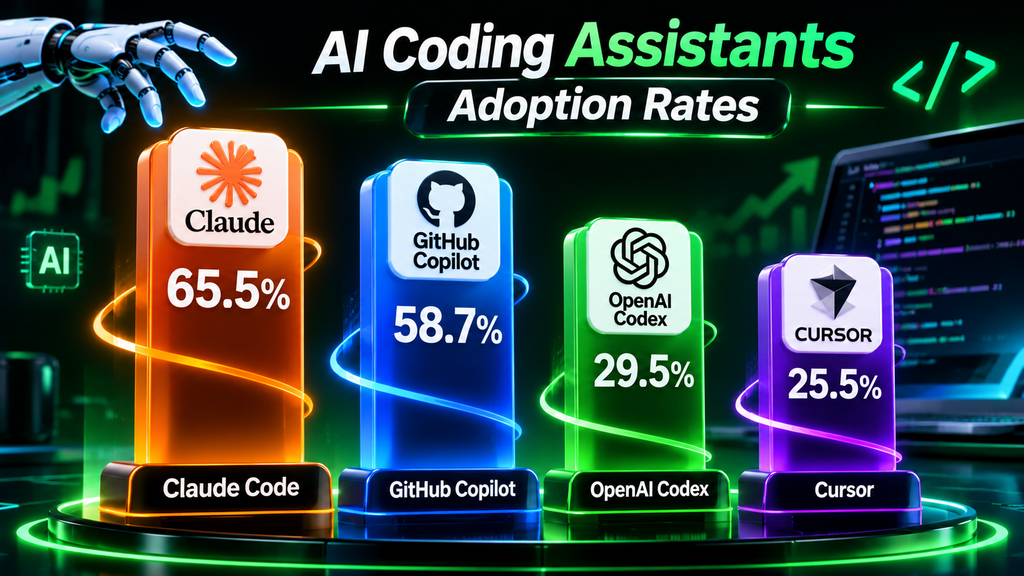
These numbers do not measure exactly the same thing as Torii’s company usage ranking. One is a developer survey, while the other examines aggregated application usage inside organizations.
Still, both reports show how important AI-assisted software development has become.
Three AI Coding Assistants Worth Knowing
Let’s look at three tools that represent different approaches to AI-powered programming.
1. Claude Code: An AI Agent for Development Tasks
Claude Code is an AI coding agent developed by Anthropic.
Unlike a basic chatbot that simply gives you a code example, Claude Code can work directly with a software project through the terminal and supported development environments.
You can give it a task, explain the problem, and let it investigate the project.
For example, imagine that your website has a problem with its navigation menu. Instead of manually checking every file, you could ask Claude Code to investigate the navigation system, identify the source of the problem, and propose a fix.
It can also help with:
- Understanding unfamiliar codebases.
- Fixing programming errors.
- Creating and improving tests.
- Refactoring existing code.
- Building new features.
- Working with Git and development tools.
However, giving an AI agent access to your project does not mean you should let it make every decision without supervision. Review its changes and control which commands it can execute.
What makes it interesting?
Claude Code is particularly useful when a task involves several files or requires understanding how different parts of a project work together.
Official website:
2. Cursor: An AI-Powered Code Editor
Cursor takes a slightly different approach.
Rather than working mainly through a terminal, Cursor provides an AI-powered code editor designed to help developers understand, modify, and build software.
It is particularly interesting for people who want AI assistance directly inside their coding environment.
Imagine that you are developing an application and want to add a new feature.
You can explain the feature in natural language, ask Cursor to examine the relevant parts of your project, and use its AI capabilities to help plan and implement the changes.
Cursor supports workflows such as:
- Writing and completing code.
- Understanding an existing project.
- Planning new features.
- Finding and fixing bugs.
- Editing multiple files.
- Reviewing code changes.
The interesting part is that you can move between writing code yourself and asking AI to help with specific tasks.
However, Cursor is not a replacement for understanding programming. You still need to know whether the generated code is correct and whether it fits your project.
What makes it interesting?
Cursor is worth exploring if you prefer working inside a visual editor rather than relying mainly on terminal commands.
Official website:
3. GitHub Copilot: AI Assistance Inside Your Development Workflow
GitHub Copilot is one of the best-known AI coding assistants.
It helps developers write code, understand existing projects, generate suggestions, and work through programming problems.
Its capabilities go beyond autocomplete.
For example, Copilot can suggest the next lines of code while you type. You can also ask questions about a function, request an explanation of an error, or use agent mode to work through a more complicated task.
With agent mode, Copilot can determine which files need changes, propose terminal commands, edit code, and iterate when problems appear.
Developers can review its work and approve commands before they run, depending on their configuration.
Some useful applications include:
- Completing repetitive programming tasks.
- Explaining unfamiliar code.
- Generating tests.
- Finding potential bugs.
- Improving existing functions.
- Working on multi-step development tasks.
What makes it interesting?
Copilot is particularly attractive to developers who want AI assistance integrated into an existing GitHub and IDE workflow.
Official website:
AI Coding Assistants: Which One Should You Choose?
There is no single winner for every developer. The right choice depends on your working style and the kind of projects you build.
| Tool | Main approach | Best suited for |
|---|---|---|
| Claude Code | AI coding agent | Complex, multi-file development tasks |
| Cursor | AI-powered editor | Coding directly inside an AI-integrated environment |
| GitHub Copilot | Coding assistant and agent | Everyday coding and GitHub workflows |
Look, choosing a tool based only on popularity is not always the best decision.
A beginner who wants to understand programming may benefit from an assistant that explains code clearly. An experienced developer working on a large project may prefer an agent that can investigate several files and handle longer tasks.
The important thing is to choose a tool that solves an actual problem in your workflow.
What Can AI Coding Assistants Actually Do?
To understand their value, let’s move away from the technical descriptions and look at everyday development situations.
Fixing bugs: You can describe an error and ask an AI assistant to investigate the possible cause. Some tools can examine files and suggest or implement a correction.
Building website features: Developers can describe a new feature, such as a responsive navigation menu or a contact form, and ask AI to help implement it.
Understanding existing software: If you open a project written by someone else, an AI assistant can help explain its structure and how different components work together.
Writing tests: AI tools can suggest test cases and help developers identify situations that their existing tests might miss.
Improving old code: Instead of rewriting an entire application, developers can ask AI to refactor selected parts while preserving the intended behavior.
Learning programming: Beginners can ask questions about programming languages, functions, errors, and development concepts while practicing.
However, these capabilities depend on the tool, its permissions, the programming environment, and the complexity of the task.
Can AI Coding Assistants Replace Software Developers?
This is probably the question many people are asking.
The short answer is no, not completely.
AI coding assistants can automate parts of software development, but building reliable software requires more than generating code.
Someone still needs to understand what the application should accomplish, choose the right architecture, evaluate security risks, test important features, and make decisions when something goes wrong.
For example, an AI assistant might generate a working login page. But does the authentication system protect user information? Are passwords handled safely? Does the application behave correctly under unusual conditions?
These questions require careful review.
The role of developers may change as AI tools become more capable. Instead of spending all their time writing individual lines of code, they may spend more time planning systems, reviewing AI-generated work, testing applications, and managing complex projects.
If you are interested in the employment side of this development, read our related article:
Is AI Going to Take Your Job in 2027? Jobs at Risk, Careers of the Future, and How to Prepare.
The Risks Developers Should Not Ignore
AI coding assistants can save time, but using them without checking their work can create new problems.
Here are some important things to consider.
Incorrect code: AI-generated code may look correct while containing logical errors or failing in certain situations.
Security vulnerabilities: Generated code can introduce weaknesses, particularly when dealing with authentication, user information, and external services.
Privacy concerns: Developers should understand how their chosen tool handles submitted code, project information, and company data.
Unexpected changes: An AI agent working across several files might modify something that was not intended.
Overdependence: Developers who accept every suggestion without understanding it may struggle when they need to debug or maintain the application themselves.
The best approach is to treat AI as a development partner, not an unquestionable authority.
Before accepting significant changes, review the code, run tests, inspect security-sensitive areas, and keep backups or version control.
How AI Coding Assistants Connect to Agentic AI
There is another development worth understanding.
AI coding assistants are increasingly connected to a broader idea called Agentic AI.
Traditional AI assistants mainly respond to instructions. Agentic AI systems can go further by planning tasks, using tools, evaluating results, and taking multiple actions toward a defined goal.
Coding is one of the clearest examples of this approach.
For instance, an AI coding agent could receive a request to improve an application, inspect the project, prepare a plan, edit relevant files, run tests, and report what it changed.
This does not mean the system can work perfectly without human involvement. Its abilities depend on its tools, permissions, and the quality of its instructions.
To understand this development in more detail, read our guide:
What Is Agentic AI? How Autonomous AI Agents Work, Real-World Examples, and Benefits.
What Comes Next for AI-Powered Software Development?
AI coding assistants are moving beyond simple suggestions.
The next stage is likely to involve more capable agents, improved project understanding, better testing workflows, and deeper connections with development platforms.
This could make it easier for smaller teams and independent developers to build applications that previously required more time and resources.
However, more automation also creates a greater need for security, testing, and responsible development practices.
The real opportunity is not simply allowing AI to write more code. It is helping people turn ideas into working software while keeping control over the decisions that matter.
Final Thoughts
AI coding assistants are becoming an important part of modern software development.
Claude Code, Cursor, and GitHub Copilot demonstrate three different ways AI can support developers, from understanding large projects to writing code and handling multi-step tasks.
However, the best results come when developers understand their tools, provide clear instructions, and review what AI produces.
Whether you are an experienced programmer or someone learning how software works, this is a technology worth exploring.
And the most important question is no longer just whether AI can write code. It is how people can use it to build better, safer, and more useful software.
Sources and Further Reading
- Torii Research – AI Breakout: November 2026
- Stack Overflow – 2026 Developer Survey: AI Coding Agents
- Anthropic – Claude Code
- Cursor – Official Documentation
- GitHub – About GitHub Copilot
- GitHub – Using Agent Mode in Your IDE
This article is for informational and educational purposes. Features and capabilities of AI coding tools may change as their developers release updates.







1 comment
Join the conversationMentioned elsewhere
Pingback: Claude Fable 5.2: Features, Pricing & Capabilities